About
AISWorld is the official community discussion list for the Association for Information Systems. It gives AIS members a central place to stay informed, share relevant opportunities, and participate in conversation with colleagues across the global information systems community.
Whether you want to follow important announcements, exchange ideas, or connect with others in the field, AISWorld helps keep you engaged with what is happening across AIS.
What You Can Do on AISWorld
Through AISWorld, members can:
- Stay informed about important AIS and community announcements
- Share news, calls for participation, and other relevant information
- Participate in professional discussion with colleagues in the IS field
- Access listserv archives and manage subscription preferences
How to Stay Engaged
To make the most of the new AISWORLD ListServ, we encourage subscribers to:
- Update Their Subscription Preferences: Customize email delivery settings based on personal preferences.
- Familiarize Themselves with New Features: Take advantage of the ability to share attachments and enhanced discussion tools.
- Participate Actively: Engage in discussions, share insights, and contribute to the vibrant IS community.
Frequently Asked Questions
AISWORLD ListServ Archives
Not familiar with a ListServ?
A ListServ is an email-based communication platform that enables large groups to engage in discussions, share information, and stay up-to-date on key developments within a professional community. AISWORLD has long served as a hub for IS scholars, educators, and practitioners to connect, discuss emerging trends, and share valuable insights.
If you have any issues or questions, please contact webmaster@aisnet.org for assistance.
How to Use AISWorld
How to post a message from your eMail account; or watch this video.
- Similar to how it’s been done for 20 years, simply add the email ID “(aisworld@listserv.isworld.org)” in a new email. Make sure to add the domain @listserv.isworld.org to your ‘safe sender’ list in your email.
How to post a message from the Lsoft platform.
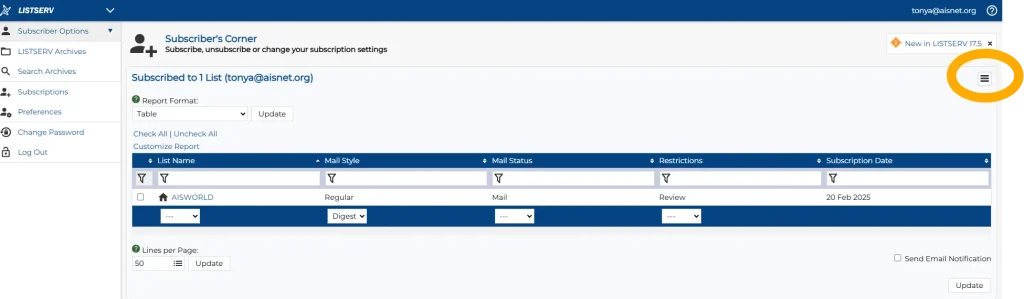
- Select the three horizontal lines on the right side screen, select “Post a Message.”
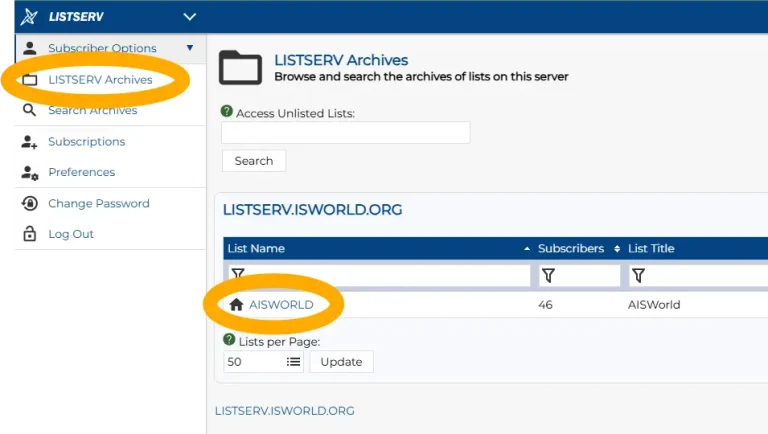
How to View Archives in the ListServ.
- Login to Lsoft at this URL (https://listserv.isworld.org/).
- Select the “LISTSERV Archives” tab, then select “AISWorld”.
How to Adjust your Settings to receive postings immediately versus a daily digest
- Login to Lsoft at this URL (https://listserv.isworld.org/).
- In the ‘Subscriber Options’ tab, select the three horizontal bars on far right and choose “Subscribe or Unsubscribe”.
- In the dropdown under “Mail Style”, you have three options:
- Regular – You will receive postings immediately.
- Digest– This combines multiple messages into a single email. You to receive a single daily digest that is sent a Noon US ET daily with postings from the prior 24 hours. You can choose between a traditional (plain text) or HTML format.
- Index – Provides a list of messages’ subjects and other metadata, allowing subscribers to choose which messages to view. You can choose between a traditional (plain text) or HTML format.
How to view ListServ archives from prior ListServs – https://aisnet.org/page/AISWORLDListServArchives
How do I remove an email address from AISWORLD?
- Login to Lsoft with the email address you wish to remove (https://listserv.isworld.org/)
- In the ‘Subscriber Options’ tab, select the three horizontal bars on far right and choose “Subscribe or Unsubscribe”
- In the dropdown under “List Name”, select “Unsubscribe”.
- Log out.